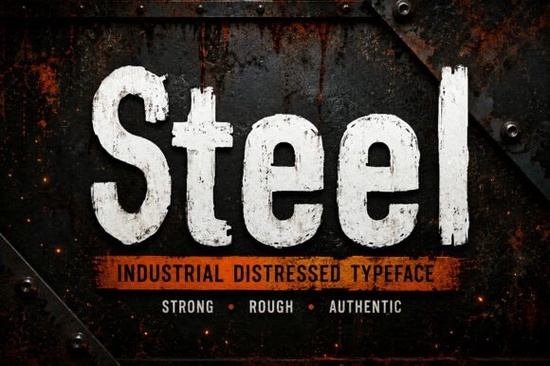
If you need a typeface that looks like it was stamped onto a crate or painted on a warehouse wall, you need something with genuine grit. The Steel Font offers exactly that rugged aesthetic. It captures the feel of worn factory signage and heavy machinery without looking messy or unreadable. This industrial distressed typeface is designed for creators who want their work to feel authentic, strong, and weathered by time.
Many designers struggle to find bold letters that don't look too clean or digital. When you are building a brand for a construction company, a mechanic shop, or a vintage clothing line, polished vectors often feel out of place. You need texture that implies durability. This font delivers uppercase and lowercase letters with a high-quality distressed texture built right into the glyphs. You do not need to add extra layers of grunge in Photoshop to get the look you want.
What kind of projects work best with this typeface?
This typeface shines in environments where strength and history matter. It is an excellent choice for industrial branding, such as logos for manufacturing firms or contracting businesses. If you are selling print-on-demand apparel, this font works well on t-shirts featuring outdoor adventures, automotive themes, or workwear designs. The heavy strokes stand out clearly against fabric textures.
Beyond logos and shirts, consider using it for product packaging. Coffee bags, craft beer labels, and tool packaging often benefit from this raw visual impact. It also performs well on social media graphics where you need to stop the scroll with a bold headline. For book covers, especially those in the thriller or historical fiction genres, the weathered look adds immediate atmosphere.
Is the distressed texture hard to read?
A common concern with grunge typography is legibility. While some distressed fonts sacrifice clarity for style, this one maintains a solid structure. The distressing is applied carefully so that the character shapes remain recognizable even at smaller sizes. However, it is primarily a display font. This means it is best used for headlines, titles, and short phrases rather than long body paragraphs.
If you are looking for other bold textured options to compare, you might explore gritty display options that offer similar weight. Sometimes, pairing a heavy industrial font with a cleaner sans-serif helps balance the design. The key is to let the texture speak without overwhelming the message. For large signage or outdoor advertising, the thick lines ensure visibility from a distance.
How does this fit into a larger font library?
Building a versatile toolkit means having styles for different moods. While this industrial style covers the rugged side of design, you might need contrasting styles for other clients. For example, if you are working on a project that requires retro-inspired collections, you can pair this with softer vintage scripts to create a dynamic contrast between hard and soft elements.
There are times when you need something more structured. If a client asks for traditional academic lettering or athletic team graphics, this steel-inspired typeface would not be the right fit. Knowing when to switch styles is part of professional design. However, for anything related to manufacturing, mechanics, or rugged outdoor lifestyles, this remains a top choice.
You can also experiment with pairing it against something playful. Using a playful script combination underneath a heavy industrial headline can create an interesting tension in poster design. This mix of styles often works well for events that want to feel both tough and welcoming.
What files are included and how do I install them?
When you download this product, you receive OTF, TTF, and WOFF formats. This ensures compatibility across different software and platforms. Whether you are using Adobe Illustrator, Canva, or a web development environment, the files are ready to use. The package includes uppercase letters, lowercase letters, numbers, and punctuation, along with multilingual support.
Installation is straightforward. On Windows, you can right-click the file and select Install. Mac users can double-click the font file and click Install Font in the preview window. Once installed, it will appear in your font menu like any other typeface. Because the texture is embedded, you do not need to worry about overlaying images to create the worn effect.
Quick Checklist for Using Distressed Fonts
- Check Contrast: Ensure the background color contrasts well with the textured letters.
- Limit Usage: Use for headlines and logos, not long paragraphs.
- Test Sizes: Print a test sheet to see how the texture holds up at different scales.
- Pair Wisely: Combine with clean sans-serifs for body text to maintain readability.
- Verify License: Always check the licensing terms for commercial use before selling products.
Start by downloading the files and testing the font in your preferred design software. Try creating a simple logo or a t-shirt mockup to see how the distressed edges interact with your background colors. This hands-on test will help you understand the weight and spacing better than looking at screenshots alone.
Try It Free Rainbow Darling Duo: Font Pairing Ideas for Creative Designs
 Creative Font Designs for Young Learners
 Font Magic for Retro Design Projects
 Trup & Tomp Font: Design Tips & Creative Uses
 Bold Dirty Fonts for Unforgettable Designs
 Fishtail Monogram Fonts for Elegant Diy Projects